
Hello Fellow Aviator!
Over the past few months, we’ve rolled out several updates for EasyVFR 4.4. Today, we’re excited to share the final release in this series: EasyVFR 4.4.6. This update wraps up all of the 24 improvements and 26 bug fixes we’ve made to enhance your flying experience. Here’s a quick overview of the highlights:
- Improved Vertical Profile (VP): Easier altitude changes, clear feasibility feedback, and better syncing in flight mode.
- Direct-To Waypoint of Active Route: Quickly re-route to any upcoming waypoint, recalculate on the fly, and easily revert if needed.
- Auto-Closing & Pinning the Info Sheet: Keep your screen clear with auto-close or pin important info when flying.
- Edit & Delete User Waypoints in Info Sheet: Manage waypoints directly from the map with a few taps.
- MSFS 2024: FSConny is update to support the new Microsoft Flight Simulator 2024,
- Other Enhancements: Improved Radio Card, better iPad Pro 13" support, GPS status updates, logbook extraction, and much more.
As you enjoy the holiday season and the start of 2025, we’ve also been working on something truly exciting behind the scenes. Here’s a little something to spark your imagination:
- What if you could explore airfields with detail even sharper than Google Earth?
- Are you a developer dreaming of tapping into the unique and powerful Dynamic Airspace Mapping from EasyVFR to create your own next-level tools?
We’d love to hear what you think of these 4.4 and upcoming improvements!
Blue skies and happy holidays,
The EasyVFR Team
On this page:
1. Vertical Profile (VP) Improvements

Easier Altitude Changes
Previously, the Vertical Profile (VP) sometimes forced a Top of Descent (TOD) over multiple legs, causing awkward “zig-zag” routes. Now:
- No Multi-Leg TOD: You decide your crossing altitudes for each leg.
- Red Leg Warnings: If your aircraft can’t complete the required climb or descent, that leg turns red, showing you where adjustments are needed.
Re-center Your Plane in the VP
When in Flying mode, tapping Re-center Position not only centers the main map but also brings your aircraft back into view on the Vertical Profile.
More Responsive VP Editing
If you need to drag and adjust altitudes on a route line, EasyVFR now smoothly updates the VP to match your new plan, giving you clear feedback every step of the way.
2. Direct-To Waypoint of Active Route
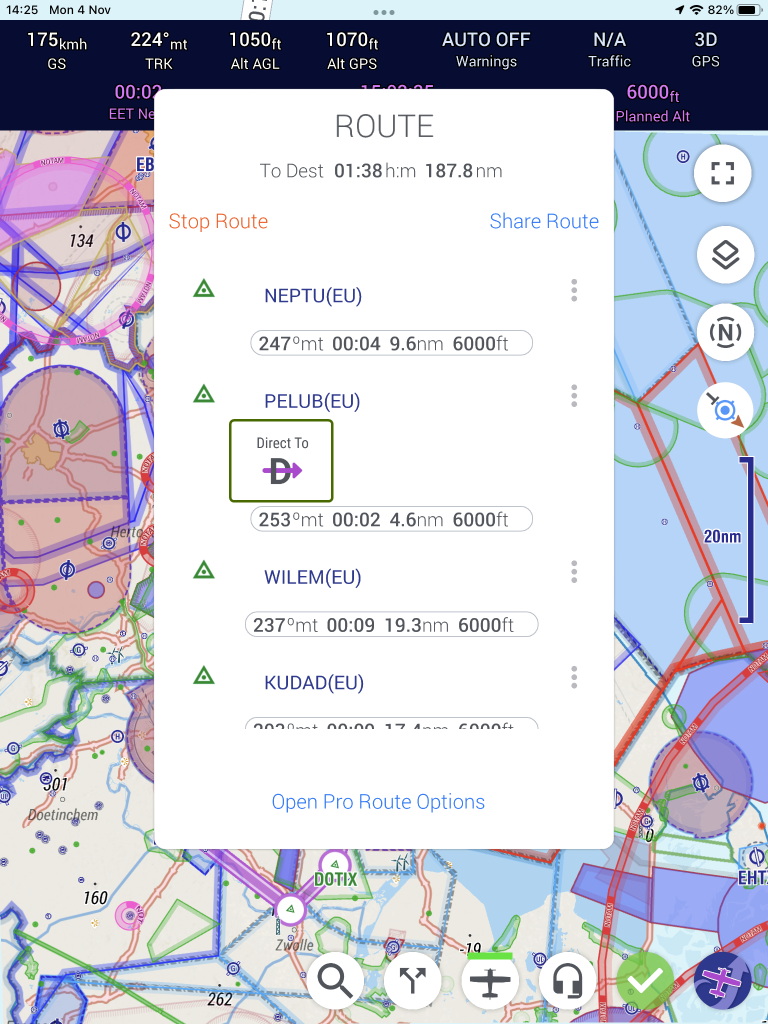
One of the most-requested features is finally here! With a route loaded in Flying mode, you can now re-route on the fly to any upcoming waypoint:
Route Card Shortcut
- Open the Route Card and spot the three dots next to an upcoming waypoint.
- Select Direct-To. EasyVFR will create a new route starting from your current position, heading straight to that waypoint.
- Your ETA, distance, and other navigation details are recalculated instantly.
Map Shortcut
- Tap on the map a waypoint that is part of the active route.
- Select Direct-To in the Info Sheet.
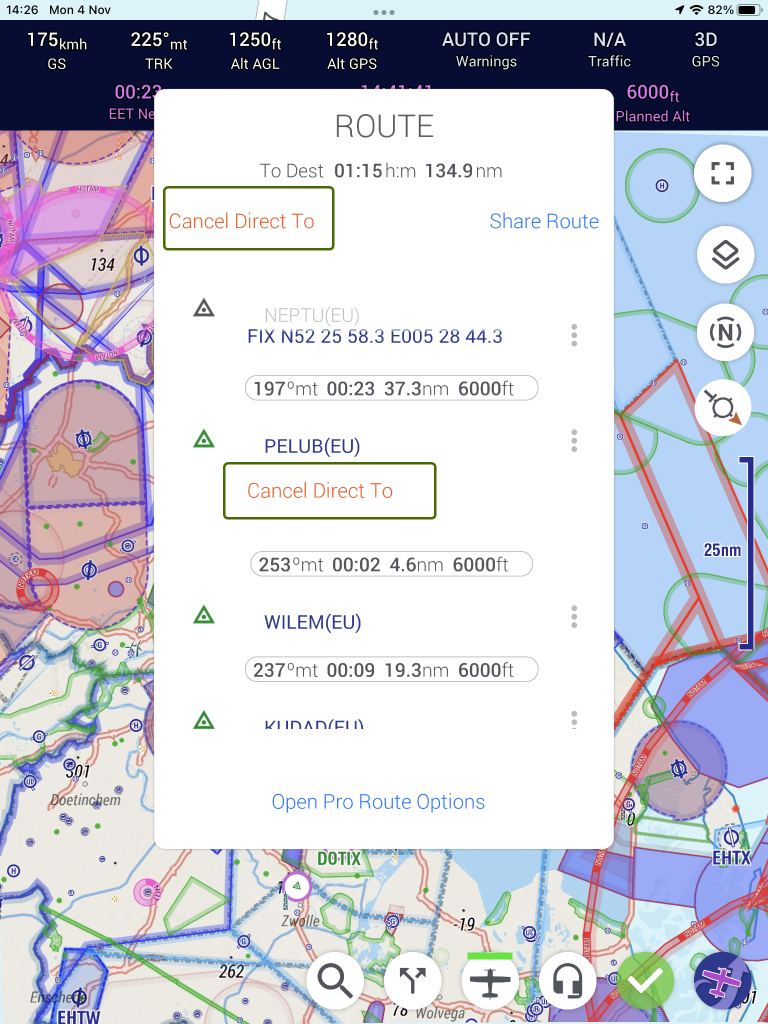
Cancel Direct-To
If you want to revert to your original route, simply select Cancel Direct-To in the Route Card. All future legs will return to normal, and the route’s calculations will switch back.
3. Auto-Closing & Pinning the Info Sheet
To keep your screen clear during critical phases of flight, we’ve introduced two new behaviors for the Info Sheet (also called the InfoCard in some places):
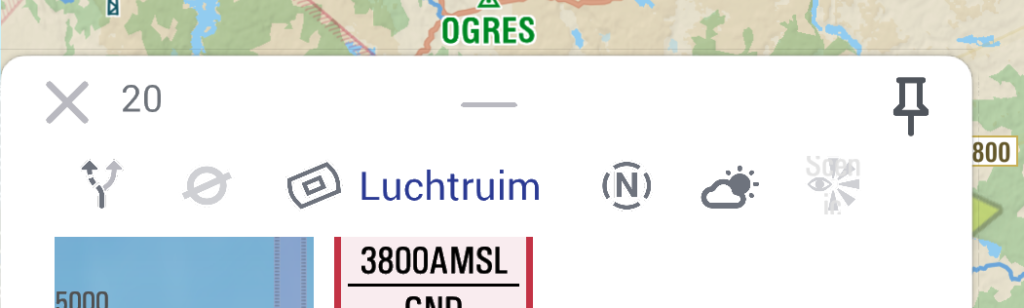
Auto-Close
When flying, the Info Sheet will automatically close after 30 seconds indicated by the countdown in the top left of the sheet.
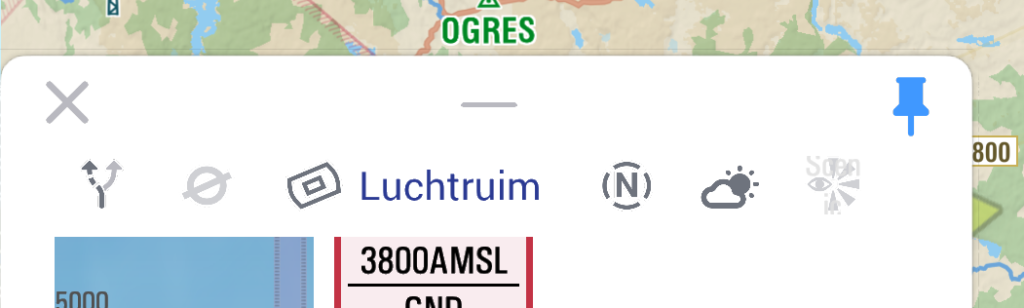
Pin It
Need it to stay open longer? Tap the Pin button at the top-right corner. The Info Sheet will stay open until you unpin it.
4. Edit & Delete User Waypoints in the Info Sheet
We’ve made waypoint management more efficient:
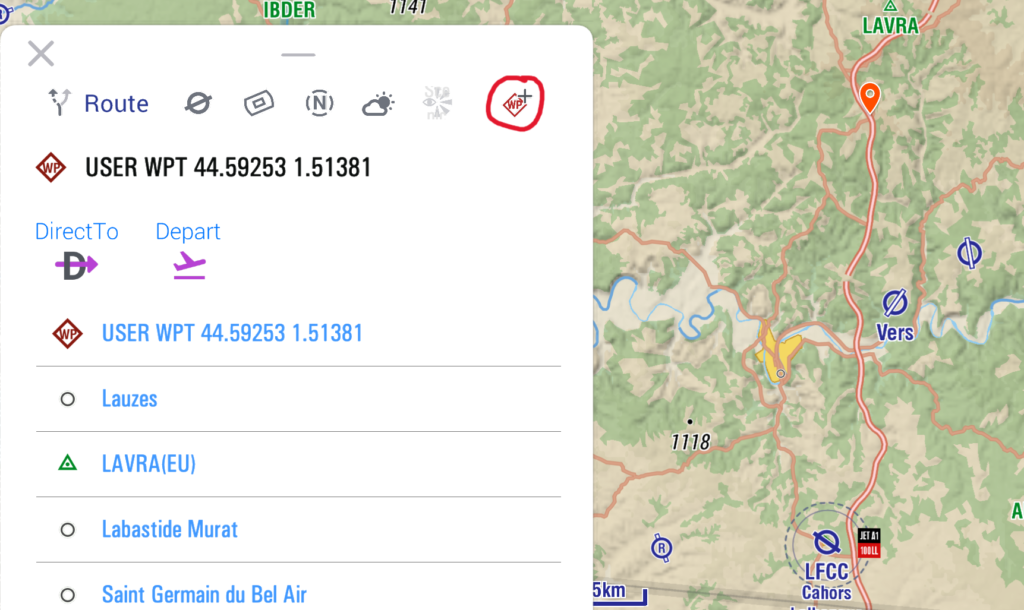
- Tap or Long-Press: Open the Info Sheet by tapping any aerodata object or long-pressing on the map.
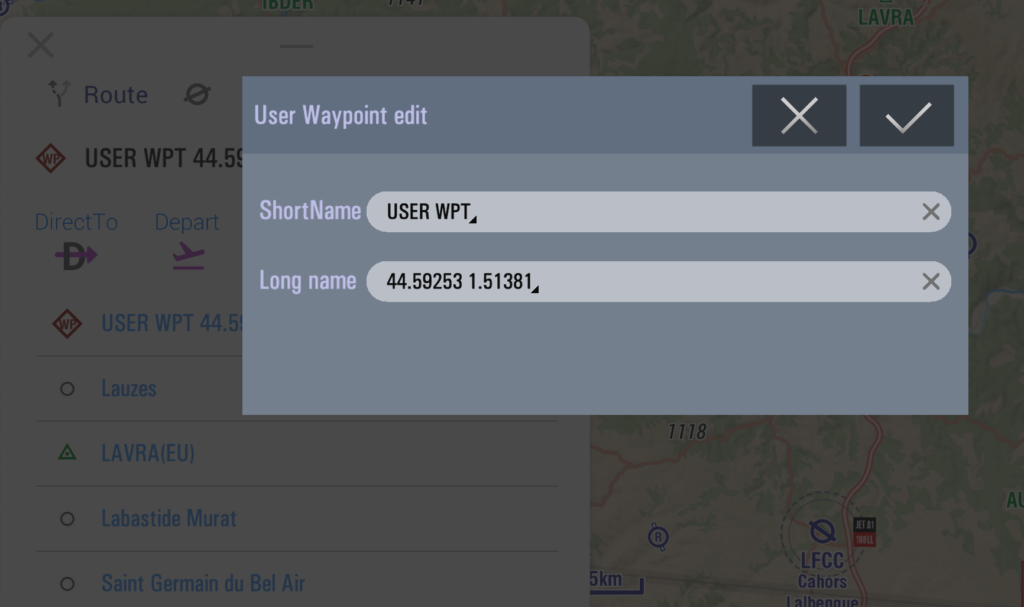
- In the AeroData Info Sheet, tap in the top-right corner the WP+ icon to create or WP pen icon edit or delete the selected waypoint—without the need to navigate through menus.
This makes managing your waypoints faster and more intuitive!
5. MSFS 2024
Ubi Sumos has updated FS Conny to work seamlessly with Microsoft Flight Simulator 2024, adding to the already extensive compatibility list for EasyVFR of Prepar3D, X-Plane, MSFS 2020, and the older MSFS X. (See easyvfr4.aero/sim for details.) Thank you, Ubi, for your help!
When connected to a simulator, EasyVFR 4 functions exactly as it does in real flight. You still get official navigation charts, NOTAMs, navaids, and airport procedures—making EasyVFR 4 the ideal tool for practicing in a simulator.
(Available with all our paid subscriptions: Live, Pro, and FFM )
6. Other Enhancements & Fixes
We’ve also introduced several smaller improvements and tweaks based on user feedback:
- Radio Card: Several small tweaks to improve guidance like displaying “Squawk ATC discretion” instead of just “ATC Discretion.”
- User Waypoints in EasyVFR Essentials: Even if you’re using the free EasyVFR Essentials tier, you can maintain your custom waypoints.
- Large Tablets with High Reselution: Optimized layout and interface for high-resolution screen like the iPad Pro 13".
- GPS Status Indicator:
- Shown by default on the Instrument Ribbon, making it easy to keep track of your GPS source.
- If your GPS source changes mid-flight, a brief popup appears and will auto-close after 10 seconds. The GPS indicator turns amber until you acknowledge the new source in the Status Card.
- Dynon & MGL Wi-Fi Transfer: In portrait mode, these transfer buttons are now vertically aligned for a cleaner layout.
- Logbook Extraction from Daily Tracklogs: Quickly pull flight details to keep your records up to date.
- Background Operations on Android: Improved stability when EasyVFR 4 runs in the background, ensuring data updates continue and vocal warnings remain active.
- In-Flight Panning: When you pan away from your current position in flight mode, tapping the yellow arrow to recenter the map also recenters your aircraft in the Vertical Profile.
There are many more new, improved, and fixed features in this release. See the release notes for all the details.
How to Update?
- On iOS? Head to the iOS AppStore.
- On Android? Visit the Google Play store.
- Using macOS on Apple Silicon? Check the AppStore for iOS apps.
- For Windows, macOS X, and Catalina users, find the latest downloads in our knowledge base.
New here? Let's get started
✍️ Create your EasyVFR 4 account today and download the app. Create account
If you already happen to have an EasyVFR 3 Standard or Frequent Flyer Membership (FFM) license that you bought directly with us, it'll work for EasyVFR 4 as well - no charge.
Download EasyVFR 4 and take it for a spin. Let us know what you think in the comments and don’t forget to check back soon for even more great EasyVFR 4 features coming your way.




0 Comments